What you need before shopping
Set up Club Publix. Create a free Club Publix account in the Publix app or at Publix.com. Add and verify the 10-digit phone number you will enter at the register. You do not need to pay through the app to redeem a clipped coupon; the phone number identifies the Club Publix account holding the offer.
Pick your store. Select the exact Publix store where you plan to shop. The selected store controls the weekly ad you see, and certain Club Publix offers are limited by area or location. Confirm the store name before you clip anything or compare a ClearCouponing breakdown with the ad.
One phone number, one account. If people in your household use different Club Publix accounts, decide which account will hold the coupon and use that account's phone number at checkout. Opening an offer on one account does not move it to another, and creating a duplicate account can make it harder to tell where the coupon was clipped.
Your quick-start kit:
- A Club Publix account
- A selected store
- The current weekly ad
- Access to the Publix app or website
Keep the app signed in so you can recheck product sizes and coupon terms before checkout.
Understand the Publix savings layers
Publix deals can use more than one type of savings, but the names are not interchangeable. Learn the four basic layers before trying to combine anything.
Savings element | What it means for a beginner |
|---|---|
Sale price | A lower advertised price that applies when the item, dates, and selected store match. |
Publix offer | A Publix coupon, Club Publix perk, or store promotion. Read its own purchase requirements. |
Manufacturer coupon | A brand-funded coupon for a qualifying product. Paper coupons must be original and match Publix policy. |
Digital coupon | An offer clipped to Club Publix and redeemed by phone number. Many are manufacturer offers, so they are not an extra layer on top of a paper manufacturer coupon for the same item. |
For combinations beyond a simple first trip, use the Publix coupon policy and stacking guide instead of guessing.
For a first trip, count each discount only once. A weekly sale and an eligible manufacturer digital coupon may both affect the same qualifying item, but a paper manufacturer coupon is not an additional layer when a manufacturer digital offer is already being used on that item. Publix policy may allow one manufacturer coupon with one qualifying Publix or accepted competitor coupon; save that kind of stacking for a later lesson.
Find this week's offers
Check the weekly ad first. In the Publix app, open Savings, choose Weekly Ad, and confirm the local store shown at the top. Do not assume every Publix ad begins on the same day: official weekly-ad communications may arrive Wednesday or Thursday depending on the identified store location.
Use ClearCouponing's breakdown. Use this week's Publix deals for the dated weekly shortlist, and the current Publix coupons and deals hub for the same-store overview. Match the breakdown's dates and region to the ad in your own account.
Write down five things before you go. The exact item, size, quantity, coupon value, and expected subtotal. This five-line plan makes it much easier to spot a wrong product or missing discount before payment.
Clip and redeem digital coupons
Clip it before you shop. Open Savings, choose Digital Coupons, and use the scissors icon to clip an eligible offer. Then open My Coupons and make sure it appears in the same Club Publix account connected to your checkout phone number. Entering the phone number after the transaction is complete will not retroactively apply the offer.
Match it at the shelf, confirm it at checkout. At the shelf, match the brand, product, size, quantity, and expiration date. At checkout, enter your verified phone number before paying. A coupon may fail if it is unclipped, expired, in another account, or does not match the quantity, variety, store, or region.
For screenshots and deeper troubleshooting, see how Publix digital coupons work.
How Publix BOGO works
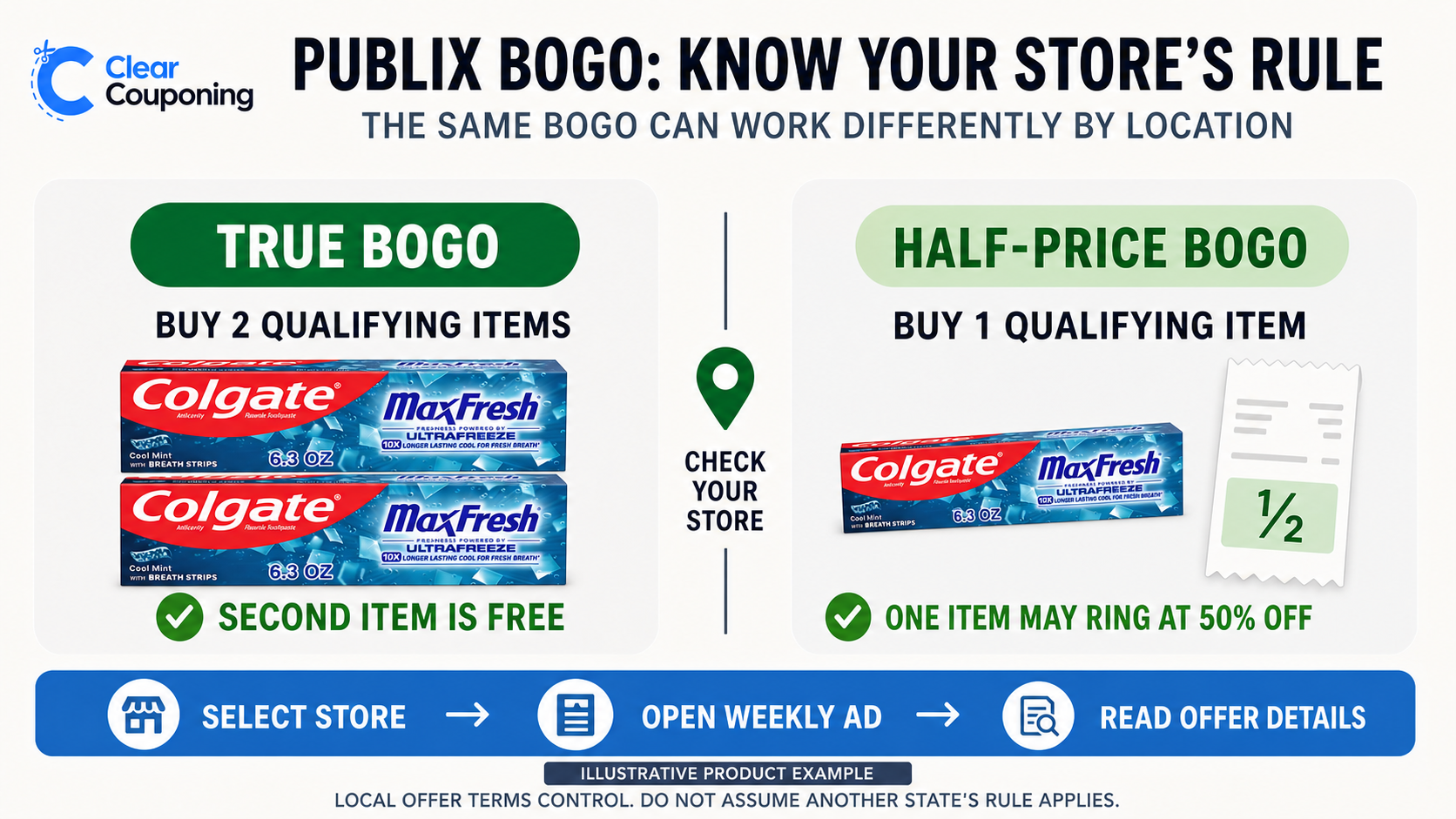
BOGO isn't the same everywhere. BOGO means buy one, get one free, but the quantity rule is regional. In some states, buying one qualifying item may ring up at half price. In other states, you must buy both items and one becomes free. Other promotions such as buy two, get two free generally require the full stated quantity. Your selected store's ad and register are the final check.
Two different resources, two different jobs. An evergreen lesson explains how BOGO rules differ, while the weekly page lists the BOGO products active for a particular ad cycle. Use the evergreen guide to understand the rule and the dated weekly list to decide what to buy now.
Read Publix BOGO rules by region before attempting a one-item BOGO purchase.
How to coupon at Publix with one first transaction
Historical example: This offer ran August 5–11, 2026 in some regions and August 6–12 in others. It has expired. Use the example only to learn the sequence and math, then choose a current offer for your selected store.
In that historical ad, Colgate Max Fresh toothpaste, 6.3 oz, was $4.99 buy one, get one free, and an eligible $4-off-two Colgate digital coupon was available in participating accounts. Buying two made the example work consistently across the regional BOGO patterns.
- For a current trip, confirm a comparable Colgate BOGO in your selected Publix store's current weekly ad.
- Clip only a current qualifying coupon and verify that the exact size and variety qualify.
- Place the required quantity in the cart and enter the phone number attached to that Club Publix account at checkout.
- Use the historical math as an illustration: two at $4.99, minus the BOGO adjustment, left $4.99; the $4 coupon reduced the expected subtotal to $0.99 before tax.
Do not expect this expired offer at the register. Choose a current deal that ClearCouponing has verified for your location, and check the open transaction before paying.
Check the result
Check the receipt against the plan. Before paying, confirm that the BOGO adjustment and $4 digital coupon appear. On the receipt, find both Colgate items, the sale adjustment, the coupon deduction, and the subtotal. The wording may vary by register, but the expected before-tax result for this selected example is $0.99.
If it's wrong, pause before paying. Recheck the store, item size, quantity, coupon status, and account phone number while the transaction is still open. A nearby variety may look similar without qualifying. Keep the receipt or e-receipt until you have confirmed the savings.
Self-checkout or cashier, same goal. At self-checkout, enter the Club Publix phone number before finishing payment and give the register time to display the discounts. With a cashier, politely say that you are checking one digital coupon and show the offer details if asked. The goal is not to debate policy at the register; it is to confirm that the product and account match the plan while changes are still easy to make.
Common Publix beginner mistakes
- Planning from the wrong store or another region's ad.
- Saving a deal to a list but never clipping the digital coupon.
- Buying the wrong size, variety, or quantity because the packaging looks similar.
- Using an expired offer or shopping after the local ad cycle ends.
- Assuming one state's BOGO quantity rule applies at every Publix store.
Beginner move: Stop before payment when the register does not match the planned math. Correcting the item or account is easier while the transaction is still open.
Your next Publix step
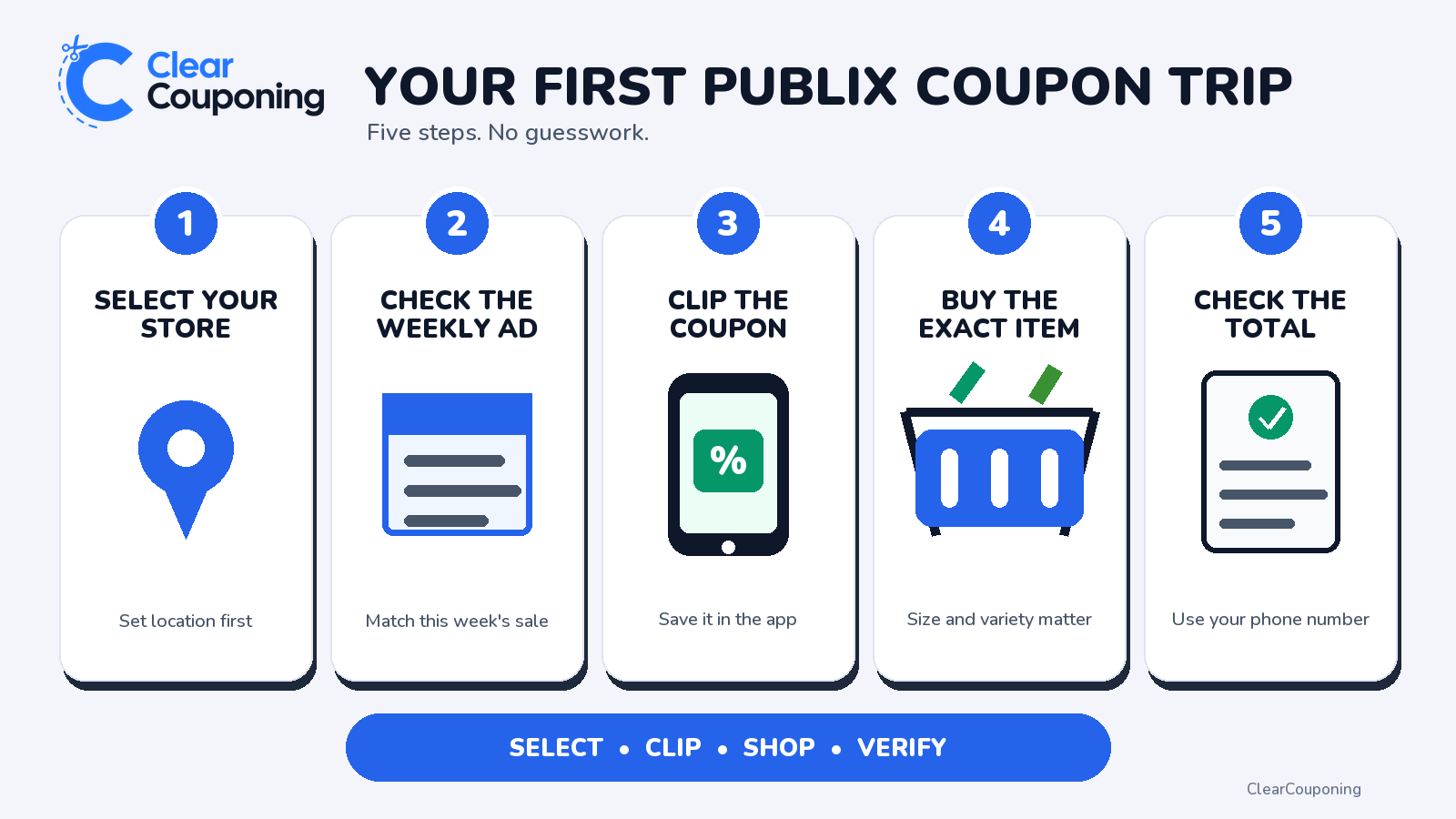
You now have one repeatable Publix routine: select the store, review the local ad, clip the matching coupon, buy the exact product and quantity, enter the right phone number, and check the register before paying. Repeat that process with one current offer instead of adding several new deal types at once.
Open this week's Publix deals and choose one beginner-friendly offer. If it uses BOGO, keep Publix BOGO rules by region nearby. In the ClearCouponing app, follow or save Publix so the current store page is easy to return to.
Continue learning
Next Guide: CVS Couponing for Beginners
Try another store: CVS | Walgreens | Target | Kroger | Family Dollar | Dollar General
Frequently Asked Questions
ClearCouponing Team
Updated Aug 11, 2026